A digital signature maker is an online tool or software solution that helps individuals and businesses create digital signatures for electronic documents. Digital signatures make it easier to sign, authenticate, and exchange documents electronically without relying on printing, signing by hand, scanning, and sending physical copies. As businesses and government departments increasingly adopt digital processes, digital signatures have become an important part of secure online transactions, electronic filing, and paperless documentation.
However, it is important to understand that a simple electronic signature created using an online tool is not necessarily the same as a Digital Signature Certificate (DSC) issued through India’s regulated digital signature framework. Both can be useful, but they serve different purposes and offer different levels of authentication and security.
In this comprehensive guide, we explain what a digital signature maker is, how digital signatures work, the different types of digital signatures, how to create a signature online, and when you may need a legally recognised Digital Signature Certificate in India.
What Is a Digital Signature Maker?
A digital signature maker is a tool that allows users to create a signature electronically for use on digital documents. Depending on the tool, users may be able to draw a signature using a mouse or touchscreen, type their name in a signature-style font, upload an image of their handwritten signature, or apply a cryptographically protected digital signature to a document.
Digital signature tools are commonly used for signing PDF files, business agreements, application forms, declarations, invoices, authorisation letters, and other electronic documents.
The term digital signature maker can refer to two different solutions:
- Online signature maker: A website or application that creates a visual representation of a person’s handwritten signature or allows the person to sign an electronic document.
- Digital Signature Certificate (DSC) solution: A system that uses a digital certificate and cryptographic keys to authenticate the signer’s identity and verify that a digitally signed document has not been altered after signing.
Choosing the right solution depends on the document you need to sign and the organisation receiving it.
For example, adding a handwritten-style signature to a personal PDF may be sufficient for a simple document exchange. However, certain government portals, corporate filings, tender submissions, and other regulated transactions may require a valid DSC of the appropriate type.
How Does a Digital Signature Maker Work?
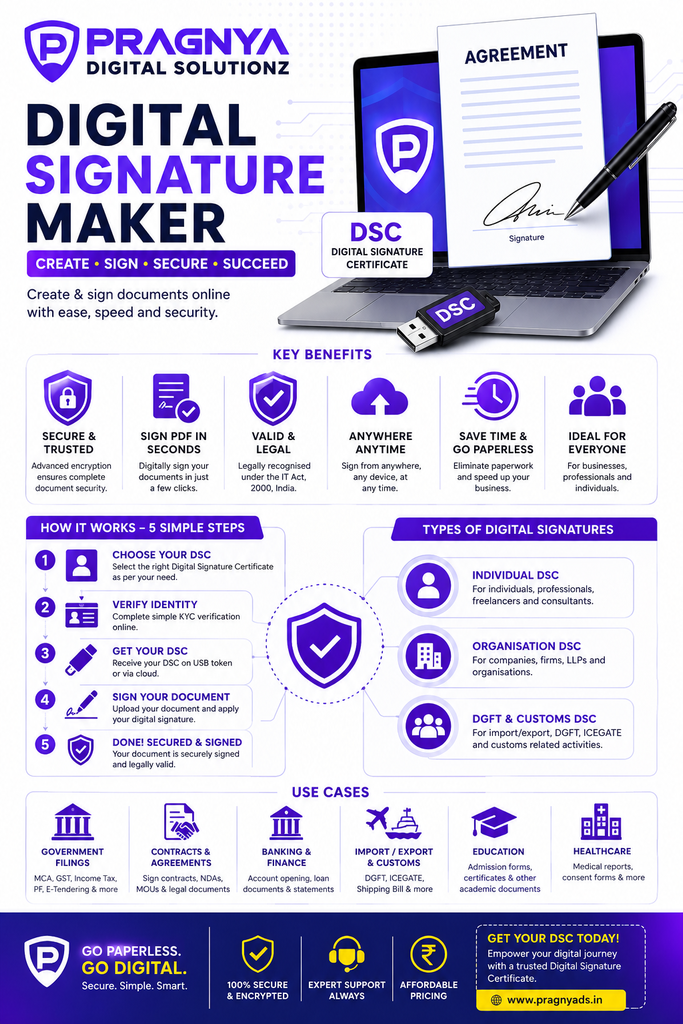
The working process depends on whether the tool creates a visual signature or applies a cryptographic digital signature.
1. Creating an Electronic Signature
A basic online signature maker usually provides a signature editor. Users can type their names, draw their signatures, or upload an existing signature image. The resulting signature can then be placed on a document.
The general process involves:
- Opening an online signature-making tool.
- Typing a name or drawing a signature.
- Adjusting the signature’s appearance, size, and style.
- Downloading the signature image or inserting it into a document.
- Saving or sharing the signed document.
This method is convenient for documents that accept electronic signatures and do not require a specific digital certificate.
2. Applying a Cryptographic Digital Signature
A certificate-based digital signature works differently. It uses public-key cryptography and a digital certificate to establish a verifiable relationship between the signer’s identity and the public key associated with the signature.
The process generally includes:
- Obtaining a Digital Signature Certificate from an authorised Certifying Authority.
- Using the corresponding private key to create a digital signature.
- Applying the signature to a supported electronic document or application.
- Allowing the recipient’s software to verify the signature using the public key and certificate.
- Checking the certificate’s validity and the document’s integrity.
If the document is modified after signing, the verification process can detect that the signed content has changed.
A certificate-based digital signature therefore provides more than a visual mark. It supports authentication, integrity, and evidence of document signing, subject to the certificate, signing process, and applicable legal requirements.
Types of Digital Signatures You Can Create Online
Before using a digital signature maker, we recommend identifying the type of signature required for your purpose.
1. Drawn Digital Signature
A drawn signature is created by using a mouse, touchscreen, stylus, or similar input device. It can resemble a handwritten signature and is often used for signing routine electronic documents.
Common uses include:
- Signing personal PDF documents.
- Approving internal business documents.
- Signing certain forms and declarations.
- Adding a signature to letters and correspondence.
A drawn signature is easy to create, but it does not automatically provide certificate-based identity verification.
2. Typed Digital Signature
A typed signature is created by entering a person’s name and displaying it in a selected font or signature style.
This option is useful when a consistent, professional signature is needed for electronic documents. However, a typed name alone does not establish that the person signing has been independently authenticated.
3. Image-Based Signature
An image-based signature is created by uploading a scanned image or photograph of a handwritten signature. The image can then be placed on a PDF, Word document, or other supported file.
This approach can save time when repeatedly signing documents that permit this method. Users should take care not to share signature images publicly or leave them accessible to unauthorised people.
4. Certificate-Based Digital Signature
A certificate-based digital signature uses a cryptographic key pair and a digital certificate. In India, a Digital Signature Certificate (DSC) issued under the applicable legal and regulatory framework can be used for electronic authentication and signing.
A DSC may be required for specific government or business transactions, depending on the portal’s requirements and the nature of the filing.
Common examples include certain MCA filings, GST-related processes where a DSC is required, e-tendering, and customs-related electronic submissions.
Unlike a basic signature image, a cryptographic digital signature can support verification of the signer and the integrity of the signed document.
Digital Signature Maker vs Digital Signature Certificate (DSC)
One of the most common questions users ask is whether an online signature maker and a DSC are the same thing.
They are not.
| Feature | Online Signature Maker | Digital Signature Certificate |
|---|---|---|
| Main purpose | Creates a visual or electronic signature | Supports certificate-based digital authentication |
| How it works | Drawn, typed, or image-based signature | Cryptographic signing using a private key |
| Identity verification | Depends on the service and signing process | Certificate identity verification under the applicable framework |
| Document integrity verification | Not inherently provided by a signature image | Supported by cryptographic verification |
| Government portal acceptance | Depends on the portal and transaction | May be required for eligible transactions |
| Issuance | Often available directly through an online tool | Issued by an authorised Certifying Authority |
| Typical use | Routine electronic documents | Regulated filings, tenders, and other certificate-based transactions |
Important: A basic online signature generator cannot replace a DSC when a government portal or receiving organisation specifically requires certificate-based digital signing.
How to Create a Digital Signature Online
Creating a digital signature online is straightforward when you know which type of signature you need.
Step 1: Identify Your Signing Requirement
First, determine the purpose of the signature.
If you only need to place your name or handwritten-style signature on a PDF, a standard electronic signature tool may be sufficient.
If you need to sign a government filing, submit an electronic tender, or complete another transaction that requires a DSC, check the relevant portal’s requirements before proceeding.
Step 2: Choose a Suitable Digital Signature Tool
Select a reputable tool that supports your document format and signing requirements.
For basic electronic signatures, check whether the tool allows you to draw, type, or upload a signature. For certificate-based signing, ensure that the software supports your DSC, document format, and operating system.
Always review the tool’s privacy policy before uploading sensitive documents.
Step 3: Create or Obtain Your Signature
For a basic signature, draw your name on the screen, select a font, or upload a signature image.
For a DSC, complete the application and identity-verification process required by the relevant authorised provider. The requirements may differ depending on the certificate type and the intended use.
Step 4: Apply the Signature to Your Document
Open the relevant PDF or other supported document and place the signature in the required position.
If you are using a certificate-based digital signature, follow the signing software’s instructions to apply the cryptographic signature. Keep your private key and any associated authentication credentials secure.
Step 5: Save and Verify the Signed Document
Save the signed document and, where supported, verify the signature status.
For certificate-based signing, check whether the certificate is recognised, whether the document has been modified after signing, and whether the validation software reports any warnings.
For electronic signature images, review the final document to ensure that the signature is correctly positioned and that the document has not been accidentally altered.
What Is a Digital Signature Certificate (DSC) in India?
A Digital Signature Certificate (DSC) is an electronic certificate used to associate a public key with an identified subscriber. It supports authentication and digital signing through cryptographic technology.
In India, DSCs are governed by the Information Technology Act, 2000, and the applicable rules and regulations. Certifying Authorities licensed under the Indian framework issue certificates according to the relevant requirements.
A DSC can help individuals and organisations conduct electronic transactions where identity authentication and document integrity are important.
Who Needs a DSC?
A DSC may be useful or necessary for:
- Company directors and authorised representatives completing applicable MCA filings.
- Businesses participating in e-tendering processes.
- Importers and exporters using customs-related electronic systems when a DSC is required.
- Professionals submitting specified electronic forms.
- Organisations that need certificate-based digital signing for approved workflows.
- Individuals and businesses whose receiving portal specifically requires a valid digital certificate.
The exact requirement depends on the transaction, the applicable rules, and the portal’s current technical specifications.
Types of Digital Signature Certificates in India
The appropriate certificate depends on the intended use and the requirements of the receiving platform.
Individual DSC
An individual DSC is issued to a person whose identity is verified under the applicable process. It can be used for eligible personal or professional digital-signing requirements.
Organisational or Business-Related DSC
Some certificate arrangements are used by businesses and authorised representatives for organisational transactions. The required certificate and identity details depend on the applicable scheme and portal.
Signing Certificates
Signing certificates are used to create digital signatures on supported electronic documents and transactions.
Encryption Certificates
Encryption certificates are designed for protecting information through encryption. Their purpose differs from that of signing certificates, and users should select a certificate based on the actual requirement.
Certificate classifications, permitted uses, and technical requirements may vary. Before applying, check the current specifications of the relevant Certifying Authority and receiving portal.
Benefits of Using a Digital Signature Maker
Digital signature tools can improve convenience and efficiency for individuals and businesses.
1. Faster Document Processing
Electronic signing reduces the need to print, sign, scan, and email physical documents. This can shorten approval cycles and help teams process paperwork more efficiently.
2. Paperless Documentation
A digital signing workflow can reduce paper consumption and simplify document storage. Electronic records can be easier to organise, search, and retrieve when managed properly.
3. Convenient Remote Signing
Users can sign supported documents from different locations without meeting in person. This is especially useful for businesses dealing with clients, vendors, employees, and partners across multiple cities.
4. Improved Document Integrity
Certificate-based digital signatures allow recipients to verify whether signed content has been changed after signing. This can help detect unauthorised modifications.
5. Better Administrative Efficiency
Businesses can integrate electronic signing into document approval, contracting, invoicing, and other workflows. The actual benefits depend on the tools and procedures used.
6. Support for Digital Business Operations
Digital signatures can support paperless processes in accounting, compliance, procurement, and other business functions where electronic signing is accepted or required.
7. Easier Record Management
Digital documents can be stored securely, organised by category, and retrieved when needed. Businesses should establish suitable access controls, backup procedures, and retention policies.
Is a Digital Signature Maker Legally Valid in India?
The legal validity of an electronic signature depends on the type of signature, the applicable law, the signing process, and the nature of the document.
India’s Information Technology Act, 2000, recognises electronic signatures and digital signatures under specified conditions. However, not every signature image or online signature generated by a free tool automatically qualifies as a legally recognised digital signature under the Act.
The Act also excludes certain categories of documents from its electronic recognition framework, subject to the applicable statutory provisions.
Before signing an important contract, statutory form, declaration, or government application, we recommend checking the requirements of the receiving organisation and seeking legal advice where necessary.
A signature that looks professional is not necessarily a certificate-based digital signature. The distinction matters when a transaction requires formal identity verification, a prescribed signing method, or a particular type of DSC.
How to Choose the Best Digital Signature Maker
Choosing the right digital signature maker involves more than finding a free tool. The best option is one that meets your signing requirements while protecting your information.
Consider the following factors before selecting a solution.
Security and Privacy
Choose a provider with clear privacy practices and appropriate security controls. Avoid uploading confidential contracts, financial records, identity documents, or other sensitive files to unknown websites.
Supported File Formats
Check whether the tool supports PDF documents and any other formats you regularly use.
Ease of Use
A good interface should make it easy to create, position, save, and review a signature without unnecessary steps.
Compatibility
For DSC-based signing, confirm compatibility with your browser, operating system, certificate, token, and the target portal’s current requirements.
Verification Features
If the document requires a cryptographic signature, select a solution that supports digital certificate verification and document-integrity checks.
Transparent Pricing
Review subscription fees, certificate charges, renewal costs, token requirements, and any additional service charges before purchasing a product.
Customer Support
Reliable support can be important when a certificate must be configured or a government filing has a deadline.
Common Problems When Creating a Digital Signature Online
Users may encounter problems when creating a signature or applying a DSC to an electronic document.
The Signature Is Not Appearing on the PDF
For a basic electronic signature, check that the signature was inserted into the document and saved correctly. Reopen the file to confirm that the signature remains visible.
The Digital Signature Is Showing as Invalid
A certificate-based signature may show a warning because the certificate is untrusted, expired, revoked, or otherwise invalid, or because the document was modified after signing. Some warnings may also arise when the software cannot establish the certificate’s trust chain or check its status.
Review the exact validation message before taking corrective action.
The DSC Is Not Detected
If you use a hardware token, check that the token is connected correctly and that the required drivers or signing components are installed. Follow the instructions provided by your certificate provider and the relevant portal.
The Government Portal Is Rejecting the Signature
Confirm that the certificate type is accepted for the transaction, the certificate is valid, and the portal’s technical requirements have been met. Some portals require specific signing software or additional configuration.
The Signature Image Looks Blurry
Use a clear, high-resolution signature image and ensure that the document editor does not excessively stretch or compress it.
For a certificate-based signature, image quality is separate from cryptographic validity.
Digital Signature Maker for Businesses and Professionals
Digital signature tools are useful across a range of industries, but the right solution depends on the workflow.
For small businesses: Electronic signatures can simplify routine approvals, proposals, and business correspondence.
For accountants and tax professionals: Certificate-based signing may be required for particular electronic submissions, depending on the relevant portal and transaction.
For company directors: A valid DSC may be needed for specific corporate filings and other authorised activities.
For exporters and importers: Customs-related electronic transactions may require an appropriate DSC or other approved authentication method.
For consultants and service providers: Electronic signing can help streamline agreements, service authorisations, and document approvals.
For educational institutions: Digital signing may be used for selected administrative documents, subject to the institution’s policies and the receiving organisation’s requirements.
In each case, we recommend distinguishing between a convenient visual signature and a certificate-based signature that supports cryptographic verification.
Frequently Asked Questions About Digital Signature Makers
1. What is the best digital signature maker?
The best digital signature maker depends on your requirements. If you need a handwritten-style signature for a routine PDF, choose a reputable electronic signature tool. If you need a cryptographically verifiable signature for a regulated transaction, use compatible signing software and the appropriate digital certificate.
2. Can I create a digital signature online for free?
Yes. Some online tools let users draw, type, or upload a signature without charge. However, these tools may not issue a Digital Signature Certificate or provide certificate-based authentication. Check the provider’s terms, privacy policy, and feature limitations.
3. Is an online signature maker the same as a DSC?
No. An online signature maker may create a visual signature or support electronic signing. A DSC is an electronic certificate used in certificate-based authentication and digital-signing processes under the applicable framework.
4. Can I create a digital signature on my mobile phone?
Yes. Many tools allow users to draw or apply electronic signatures using a touchscreen. Certificate-based signing on a mobile device depends on the certificate, application, hardware or authentication method, and the receiving platform’s requirements.
5. Can I use a digital signature maker to sign a PDF?
Yes. Many electronic signature tools support PDF files. If the receiving organisation requires a certificate-based digital signature, ensure that your software supports that method rather than simply inserting a signature image.
6. Is a scanned signature valid for official documents?
A scanned signature may be accepted for some documents, but acceptance depends on the document, the receiving organisation, and applicable law. It does not automatically provide the identity verification and document-integrity protections associated with a cryptographic digital signature.
7. How can I get a DSC in India?
You can apply through a Certifying Authority authorised under India’s digital-signature framework. The application process may involve identity verification, supporting documents, and other prescribed requirements. Confirm the appropriate certificate type before applying.
8. How long does it take to obtain a DSC?
Processing time varies according to the provider, certificate type, completeness of the application, and identity-verification process. Check the provider’s current processing estimates before applying, particularly if you have a filing deadline.
9. Can I use one DSC for every government portal?
Not necessarily. Acceptance depends on the portal, certificate type, validity, technical compatibility, and the user’s authorisation. Always check the requirements for the specific transaction.
10. Is a digital signature safe?
A properly implemented certificate-based digital signature can help authenticate the signer and detect changes to signed content. Security also depends on protecting the private key, using trusted software, validating certificates, and following appropriate security practices.
Conclusion: Choose the Right Digital Signature Maker for Your Needs
A digital signature maker can make electronic document signing faster, easier, and more convenient. Whether you need to sign a PDF, approve a business document, or complete an online application, choosing the right signing method can save time and simplify your workflow.
For routine documents, a reputable electronic signature tool may be sufficient. For government filings, e-tendering, customs-related transactions, and other activities that require certificate-based authentication, an appropriate Digital Signature Certificate (DSC) may be necessary.
Before signing, confirm the receiving organisation’s requirements, choose a suitable tool, protect your personal information, and verify the signed document when appropriate.
By understanding the difference between an online signature maker and a DSC, individuals and businesses in India can select a secure and suitable solution for their electronic-signing needs.