A Digital Signature Certificate (DSC) is an electronic credential used to verify the identity of an individual or organisation when signing documents and completing online transactions. In India, digital signatures are widely used for government portals, business registrations, income tax-related processes, e-tendering, company filings, and import-export documentation through platforms such as ICEGATE.
If you want to learn how to make a digital signature, it is important to understand the difference between creating a simple electronic signature and obtaining an official Digital Signature Certificate. While a basic electronic signature may be suitable for signing certain everyday documents, a DSC provides a certificate-based method of authentication and digital signing that can be used for specific legally recognised transactions.
In this comprehensive guide, we explain how to apply for a Digital Signature Certificate in India, which documents are required, how the verification process works, how to install and use a DSC, and how to choose the right certificate for your needs.
DSC Request Form
What Is a Digital Signature?
A digital signature is a cryptographic method used to verify the authenticity and integrity of an electronic document or message. It helps establish that a document was signed using a particular digital signing key and allows the recipient to detect certain changes made to the document after it was signed.
Digital signatures use public-key cryptography, which involves two mathematically related keys:
- Private key: Used to create the digital signature. It should remain under the control of the authorised signer.
- Public key: Used to verify the digital signature.
- Digital Signature Certificate: An electronic certificate that associates a public key with the identity of the certificate holder.
In India, a DSC is generally issued by a licensed Certifying Authority (CA) under the applicable legal and regulatory framework.
Unlike an image of a handwritten signature pasted into a document, a certificate-based digital signature can provide cryptographic verification of the signed content. Depending on the signing software and certificate, the recipient may be able to verify the signer’s identity, the certificate’s validity, and whether the document has been modified after signing.
Why Is a Digital Signature Important?
Digital signatures help individuals and businesses complete eligible online processes without relying on physical paperwork for every transaction.
Common benefits include:
- Identity authentication: Helps establish the identity associated with a digital certificate.
- Document integrity: Makes unauthorised changes to signed content detectable.
- Paperless transactions: Supports electronic submission and signing of documents.
- Business efficiency: Reduces the need to print, sign, scan, and physically deliver documents.
- Online compliance: Enables digital signing where a government portal or other service requires an accepted DSC.
- Convenience: Allows authorised users to sign eligible documents from a computer using compatible software and signing credentials.
A digital signature does not automatically guarantee that every document is legally valid or that every recipient will accept it. Acceptance depends on the applicable law, the type of transaction, the certificate, and the requirements of the receiving platform.
What Is a Digital Signature Certificate (DSC)?
A Digital Signature Certificate (DSC) is an electronic certificate issued by a licensed Certifying Authority to identify the person or entity associated with a public key.
In India, DSCs are commonly used for electronic authentication and digital signing on supported government and business platforms. The certificate may be issued to an individual, an authorised representative, or another eligible applicant, depending on the certificate type and the issuer’s requirements.
A DSC generally contains information such as the certificate holder’s identity, the public key, the issuing authority, the certificate’s validity period, and other technical details.
The private key used to create signatures is separate from the public information in the certificate. Keeping the private key secure is essential because access to it may enable someone to create signatures associated with the certificate holder.
Digital Signature vs. Digital Signature Certificate
Although these terms are often used interchangeably, they refer to different things.
| Feature | Digital Signature | Digital Signature Certificate |
|---|---|---|
| Meaning | The cryptographic signature applied to data or a document | The electronic certificate associating a public key with an identity |
| Purpose | Helps verify authenticity and document integrity | Helps establish the identity associated with the public key |
| Created or issued by | Generated using signing software and a private key | Issued by a licensed Certifying Authority |
| Typical use | Signing electronic documents and submissions | Establishing certificate-based identity for digital signing |
| Validity | Depends on the signed data and verification context | Has a defined certificate validity period |
Understanding this distinction helps you select the correct service when applying for a DSC online.
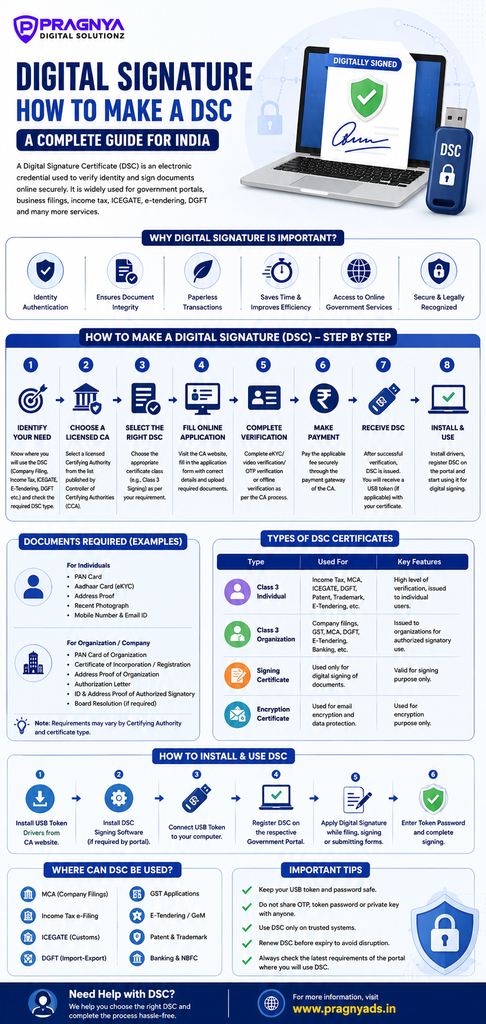
How to Make a Digital Signature in India: Step-by-Step Guide
If you want to create an official digital signature for business, government filings, or online documentation, you generally need to obtain a suitable DSC from a licensed Certifying Authority. The exact process depends on the certificate type, the intended use, and the issuer’s verification procedure.
The Government of India’s Controller of Certifying Authorities (CCA) provides information about licensed providers and the certificate issuance framework. You can check the official CCA website before choosing a service provider.
Step 1: Identify Why You Need a Digital Signature
Before applying, identify the website or service where you intend to use the DSC. Different applications may have different certificate requirements.
For example:
- Company filings: A DSC may be required for eligible electronic filings and submissions through the Ministry of Corporate Affairs system.
- Income tax services: Certain tax-related processes may require a registered DSC.
- ICEGATE: Importers, exporters, customs brokers, and other eligible users may need a compatible DSC for specified customs-related activities.
- Government e-tendering: Many tender portals require a valid certificate that meets their technical and authentication requirements.
- DGFT services: Certain foreign trade applications and submissions support or require digital signing.
- Business documentation: A DSC can be used to digitally sign supported electronic documents and forms.
Do not select a certificate based only on its price. First check the current instructions of the portal where you intend to use it.
Step 2: Choose a Licensed Certifying Authority
The next step is to select a licensed Certifying Authority that issues certificates suitable for your purpose.
Some providers listed by the CCA include:
- eMudhra
- Capricorn
- nCode Solutions
- Safescrypt
- VSign
You can review the official list of licensed Certifying Authorities and compare the services offered by each provider.
When comparing providers, consider the certificate type, validity period, application process, verification requirements, USB token availability, support services, renewal fees, and total cost.
Step 3: Select the Appropriate DSC Type
After selecting a provider, choose the certificate category that matches your requirements.
The CCA framework distinguishes certificate classes according to identity verification and private-key generation and storage requirements. For example, Class 3 certificates require stronger verification and hardware-based private-key storage under the applicable requirements.
Your selected portal may specify the certificate class, signing purpose, supported token, or other technical conditions. Follow those instructions rather than assuming that every DSC works on every website.
You may also encounter certificates described as signing certificates, encryption certificates, or certificates supporting both purposes. These are not interchangeable in every application.
- Signing certificate: Used to create digital signatures.
- Encryption certificate: Used for supported encryption-related operations.
- Combined or separate certificates: The appropriate arrangement depends on the portal’s requirements.
For ordinary digital signing, do not purchase an encryption certificate unless your intended application requires it.
Step 4: Complete the Online DSC Application
Visit the official website of your selected Certifying Authority and locate the application section for the required certificate.
The application process may involve the following activities:
- Select the appropriate certificate and applicant category.
- Enter your name and other required identity details.
- Provide your email address and mobile number.
- Enter any required PAN, address, or organisation details.
- Upload the requested documents, if applicable.
- Complete the required identity verification.
- Review the application carefully before submission.
- Pay the applicable fee using the provider’s authorised payment process.
Some providers offer paperless applications using electronic KYC, while others may support additional verification methods. The available options depend on the certificate type and the provider’s current procedures.
Important: Enter your details exactly as required by the issuer. Differences in names, PAN details, or organisational information can lead to verification delays or rejection.
Step 5: Submit the Required Documents
The documents required for a DSC depend on whether the applicant is an individual, an authorised representative of a business, or another eligible applicant category.
For an individual application, the provider may request:
- PAN card or another accepted identity document.
- Aadhaar-based KYC or other supported verification.
- Address proof, where required.
- A recent photograph, where required.
- A valid mobile number and email address.
- Additional declarations or application forms specified by the issuer.
For an organisation-related application, additional requirements may include:
- Organisation registration or incorporation details.
- An authorisation letter.
- Proof of the authorised signatory’s identity.
- Details of the applicant’s role within the organisation.
- Other documents requested by the Certifying Authority.
These are examples, not a universal checklist. Some electronic KYC methods may eliminate the need to submit separate supporting documents. Always follow the current checklist supplied by your selected provider.
Step 6: Complete Identity Verification
Identity verification is an essential part of obtaining a DSC. The Certifying Authority must verify the applicant according to the applicable requirements before issuing the certificate.
Depending on the provider and certificate type, verification may involve Aadhaar eKYC, OTP-based authentication with additional verification, video verification, or a paper-based process.
You may need to:
- Verify your mobile number using an OTP.
- Confirm the details submitted in your application.
- Complete a video or other identity verification procedure.
- Provide additional information if requested.
- Accept the subscriber agreement and application terms.
Do not share OTPs, private keys, or token passwords with unauthorised persons. If someone is assisting with your application, make sure the process is handled through the provider’s authorised channels.
Step 7: Obtain Your Digital Signature Certificate
After the Certifying Authority verifies and approves your application, it will provide instructions for obtaining or activating your certificate.
Depending on the product, the DSC may be provisioned through a hardware cryptographic token or another supported mechanism. Many certificate products used for business and government applications require a compatible USB token.
If a USB token is supplied, follow the provider’s instructions to initialise it, install the necessary drivers, and set a secure token password. If the certificate is delivered through a different supported method, follow the issuer’s activation instructions.
The certificate is ready for use only when the issuance and activation requirements have been completed successfully.
Documents Required for a Digital Signature Certificate
The following table summarises common document categories that may be requested during the application process.
| Applicant category | Possible requirements |
|---|---|
| Individual | Identity details, PAN or other accepted identification, and KYC information |
| Sole proprietor | Individual KYC and any business information required for the intended certificate |
| Company representative | Identity verification, organisation details, and authorisation documents |
| Partnership firm representative | Individual identification, firm details, and applicable authorisation |
| Other organisation or authorised applicant | Documents prescribed for the applicant category by the issuer |
Aadhaar-based eKYC may allow eligible applicants to complete verification without uploading separate supporting documents. However, this depends on the provider’s available verification options.
Before applying, prepare clear, readable documents and ensure that the details match your application. If you are applying on behalf of an organisation, confirm that the proposed certificate holder is authorised to act in that capacity.
How to Install a Digital Signature on Your Computer
After receiving your DSC, you may need to configure your computer before using it on a government portal or document-signing application.
Step 1: Install the Required USB Token Driver
If your DSC uses a USB cryptographic token, connect the token to your computer and install the driver specified by the manufacturer or Certifying Authority.
Download the driver only from an official source. Avoid downloading token software from unknown websites.
Step 2: Install the Required Signing Utility
Some government portals require a specific digital-signing application or browser integration. Download the required software from the official portal or certificate provider.
For example, certain DGFT workflows have historically required compatible token drivers and a signing utility. The exact requirements can change, so consult the current instructions for your portal.
Step 3: Connect Your DSC Token
Insert your USB token into an available USB port. Open the required signing utility, if applicable, and check whether your certificate is detected.
If the certificate is not displayed, verify that the token driver is installed correctly and that the certificate has been issued and activated.
Step 4: Register the DSC on the Required Portal
Some websites require users to register their DSC before submitting digitally signed applications.
A typical registration process may involve:
- Logging in to the relevant portal.
- Opening the DSC registration or digital signature section.
- Selecting the appropriate signing certificate.
- Entering the token password when prompted.
- Completing the signing or registration operation.
- Confirming that registration has been successful.
The precise steps depend on the portal. Do not assume that registration on one website automatically registers the DSC on every other website.
How to Make a Digital Signature on a PDF Document
If your objective is to digitally sign a PDF, the process depends on whether you need a certificate-based digital signature or simply an electronic signature.
Method 1: Sign a PDF Using a DSC
Follow these general steps:
- Obtain a valid DSC appropriate for the signing task.
- Install the required certificate and token software.
- Open the PDF using compatible digital-signing software.
- Select the option to digitally sign the document.
- Choose the appropriate certificate.
- Enter your token password or complete the required authentication.
- Save the digitally signed PDF.
- Open the signed file and verify the signature status.
A valid certificate-based signature can help recipients verify the document’s integrity and the certificate associated with the signer. However, the displayed verification result may depend on certificate trust settings, expiry, revocation status, and the software used to inspect the file.
Method 2: Add an Electronic Signature to a PDF
For documents that do not require a DSC, you may be able to use a compatible PDF application to draw your signature, type your name, or insert an image of your handwritten signature.
However, an image of a signature is not the same as a certificate-based digital signature. Some transactions specifically require a DSC or another approved signing method.
Always check the recipient’s requirements before deciding which method to use.
How to Make a Digital Signature for ICEGATE
ICEGATE is India’s electronic gateway for customs-related transactions. Depending on the user’s role and the service being accessed, a compatible DSC may be required for registration, authentication, or digital signing.
If you need a DSC for ICEGATE, follow these steps:
- Identify the relevant ICEGATE service and its current DSC requirements.
- Select a suitable certificate from a licensed Certifying Authority.
- Complete the application and identity verification process.
- Obtain and activate the certificate.
- Install the required token driver and signing software, if applicable.
- Log in to the official ICEGATE website.
- Follow the portal’s instructions for registering or using the DSC.
- Test the certificate with an eligible transaction or registration step.
Before purchasing a certificate, confirm the required certificate type and technical compatibility with the current ICEGATE instructions. A DSC that works on one government portal may not automatically work for every other portal.
For official information, visit the ICEGATE website.
How Much Does a Digital Signature Certificate Cost in India?
The cost of a DSC varies according to the provider, certificate type, validity period, hardware token, and any additional services included.
Your total expense may include:
- Certificate issuance charges.
- USB cryptographic token charges, if required.
- Identity verification or related service charges, where applicable.
- Renewal charges when the certificate expires.
- Optional assistance or support services.
There is no single price that applies to every DSC. Compare the total amount payable, including applicable taxes and token costs, before making a purchase.
Also, check the certificate’s validity period and renewal procedure. A certificate that is inexpensive initially may not be the most economical choice if the total renewal and hardware costs are higher.
Common Problems When Creating a Digital Signature
Even after a DSC has been issued, users may encounter technical problems. The following checks can help resolve common issues.
1. DSC Is Not Detected
Possible causes include an incorrectly installed token driver, a faulty USB connection, or an unsupported token.
What to do: Reconnect the token, check the manufacturer’s instructions, and reinstall the official driver if necessary.
2. DSC Is Not Showing on a Government Portal
The certificate may not be registered, the signing utility may not be running, or the browser and portal may not be configured correctly.
What to do: Follow the portal’s current DSC registration instructions and check whether additional software is required.
3. DSC Password Is Not Working
A password may have been entered incorrectly, or the token may have become locked after repeated failed attempts.
What to do: Check the token documentation and contact the provider’s support team. Avoid repeatedly guessing the password, as the token may impose lockout restrictions.
4. DSC Has Expired
An expired certificate may not be accepted for new digital-signing operations.
What to do: Apply for renewal or reissuance through the Certifying Authority, following its current procedures.
5. Digital Signature Shows an Invalid Status
A signature may appear invalid because of document changes, certificate trust problems, expiry, revocation, or verification software limitations.
What to do: Check the signature details using compatible software, confirm the certificate’s status, and investigate whether the signed document has been modified.
Frequently Asked Questions About Making a Digital Signature
1. How can I make a digital signature online?
You can apply for a DSC online through a licensed Certifying Authority. The process generally involves selecting the certificate, submitting the application, completing identity verification, and obtaining the issued certificate. Some applications offer paperless eKYC.
2. Can I create a digital signature for free?
You may be able to create an electronic signature using free software, depending on the application. However, an official DSC suitable for government or business transactions may involve certificate and hardware costs. Check whether the intended recipient requires a certificate-based digital signature.
3. Is a digital signature the same as a scanned signature?
No. A scanned signature is an image of a handwritten signature. A certificate-based digital signature uses cryptographic technology to support authentication and document-integrity verification.
4. Which website should I use to apply for a DSC in India?
Start with the official Controller of Certifying Authorities website to identify licensed Certifying Authorities. Apply through a provider whose certificate meets your intended use.
5. Can I apply for a DSC without visiting an office?
Some Certifying Authorities offer online applications and electronic KYC. Whether the entire process can be completed remotely depends on the certificate type and the provider’s verification requirements.
6. How long does it take to obtain a DSC?
Processing time varies according to the provider, the application details, identity verification, and certificate type. An application may be delayed if the information is incomplete or additional verification is required. Check the provider’s current processing estimate.
7. Can one DSC be used on multiple government portals?
A certificate may be usable on multiple compatible portals, but this is not guaranteed. Each portal may impose its own certificate, registration, software, and authorisation requirements.
8. What happens when a DSC expires?
An expired certificate may no longer be accepted for new signing operations. You should arrange renewal or reissuance through the Certifying Authority and update the certificate registration on relevant portals if required.
9. Is a USB token necessary for every digital signature?
No. The storage and signing method depend on the service. Many DSC products used for business and government applications rely on hardware cryptographic tokens, while certain electronic signature services use different approved mechanisms.
10. Is a DSC legally valid in India?
Digital signatures are recognised under the applicable provisions of India’s Information Technology Act, 2000, subject to the relevant legal requirements. Whether a particular signature is sufficient for a specific transaction depends on the law and the requirements of the receiving party or portal.
Conclusion: Create Your Digital Signature the Right Way
Learning how to make a digital signature is an important step towards completing online business transactions, government filings, and electronic documentation efficiently.