

Launching an e-commerce store involves much more than uploading products and connecting a domain. A successful online store needs a reliable technical foundation, intuitive user experience, secure payment processing, accurate inventory management, fast mobile performance, and a carefully tested customer journey.
Before making an online store publicly available, we should systematically review every important component. A comprehensive e-commerce launch checklist helps us identify technical problems, usability issues, payment failures, inventory discrepancies, and mobile design problems before they affect real customers.
This guide provides a detailed checklist covering payment gateways, UX wireframes, inventory synchronization, mobile UI readiness, website performance, security, SEO, checkout, analytics, and post-launch operations.
1. Define the E-Commerce Store Structure
Before development is considered complete, we should confirm that the entire store structure is logical and easy to navigate.
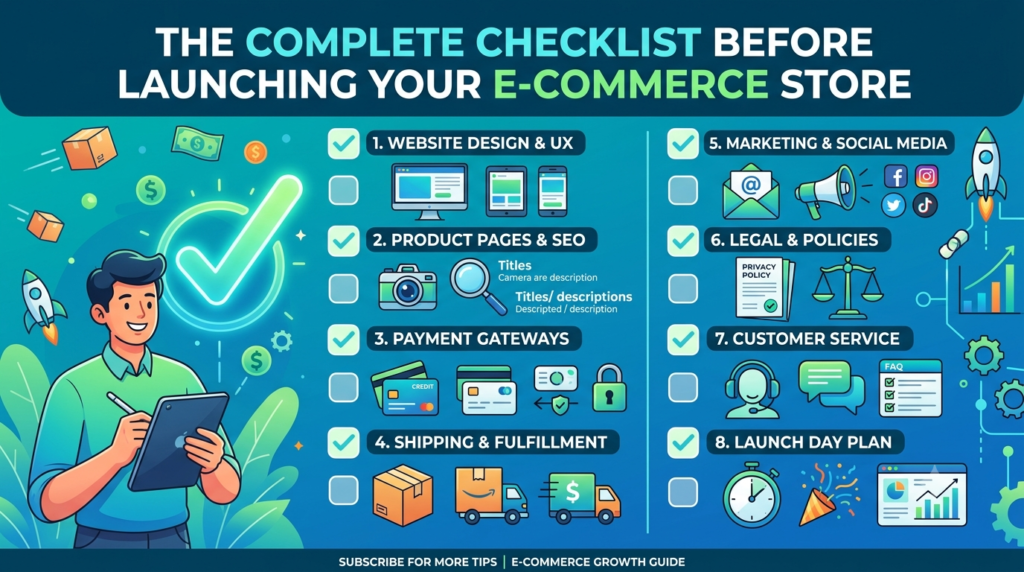
The main structure should normally include:
- Homepage
- Shop or product catalogue
- Product category pages
- Individual product pages
- Search functionality
- Shopping cart
- Checkout page
- Customer account area
- Order tracking
- Contact page
- About Us page
- Shipping information
- Return and refund policy
- Privacy policy
- Terms and conditions
- Frequently Asked Questions
We should ensure that customers can reach important products within a few clicks. Categories should be logically organized, particularly when the store contains hundreds or thousands of products.
A well-planned information architecture also helps search engines understand the relationship between categories, products, and supporting content.
2. Finalize UX Wireframes Before Launch
A professional e-commerce UX wireframe provides a visual blueprint for the customer journey before the final interface is implemented.

We should review wireframes for:
- Homepage
- Category pages
- Product pages
- Search results
- Cart
- Checkout
- Login and registration
- Customer dashboard
- Order tracking
- Mobile navigation
- Promotional landing pages
The objective should be to remove unnecessary steps from the purchasing process.
For example, the product page should make the following information immediately accessible:
Product name → Images → Price → Variants → Availability → Key features → Delivery information → Add to Cart → Buy Now
Important calls to action should be visually prominent without overwhelming the customer.
We should also check whether customers can easily return to product categories, continue shopping, modify cart quantities, and review their orders.
3. Review Product Pages Carefully
The product page is one of the most important parts of an online store.
Every product should have:
- High-quality product images
- Clear product title
- Accurate pricing
- Sale price where applicable
- Product description
- Specifications
- Available variants
- Stock availability
- SKU
- Product weight or dimensions when relevant
- Shipping information
- Return information
- Delivery estimate
- Relevant product recommendations
Images should be optimized without compromising visual quality.
We should also make sure that product variations work correctly. If a product is available in different sizes, colors, materials, or configurations, selecting a variation should update the price, SKU, stock status, and product image where applicable.
4. Configure and Test Payment Gateways
Payment gateway testing should be treated as a critical pre-launch activity.
A store may receive substantial traffic but lose sales if customers encounter payment errors at checkout.
Before launch, we should verify:
- Payment gateway configuration
- Merchant account connection
- API credentials
- Currency settings
- Supported payment methods
- Credit and debit card payments
- UPI payments where applicable
- Net banking
- Digital wallets
- International payment methods where relevant
- Payment confirmation
- Failed-payment handling
- Cancelled transactions
- Refund processing
- Partial refunds
- Order status synchronization
- Customer payment notifications
- Merchant notifications
We should conduct successful and unsuccessful test transactions. After payment, the customer should receive a clear confirmation and the order should automatically move to the appropriate status.
We should particularly test what happens when a customer completes payment but closes the browser before returning to the website. The order should still be correctly recorded through the payment gateway’s server-side confirmation mechanism.
5. Test the Complete Checkout Process
A smooth e-commerce checkout experience can significantly reduce friction.
Product → Add to Cart → Cart Review → Customer Details → Shipping Address → Shipping Method → Payment → Confirmation → Order Notification
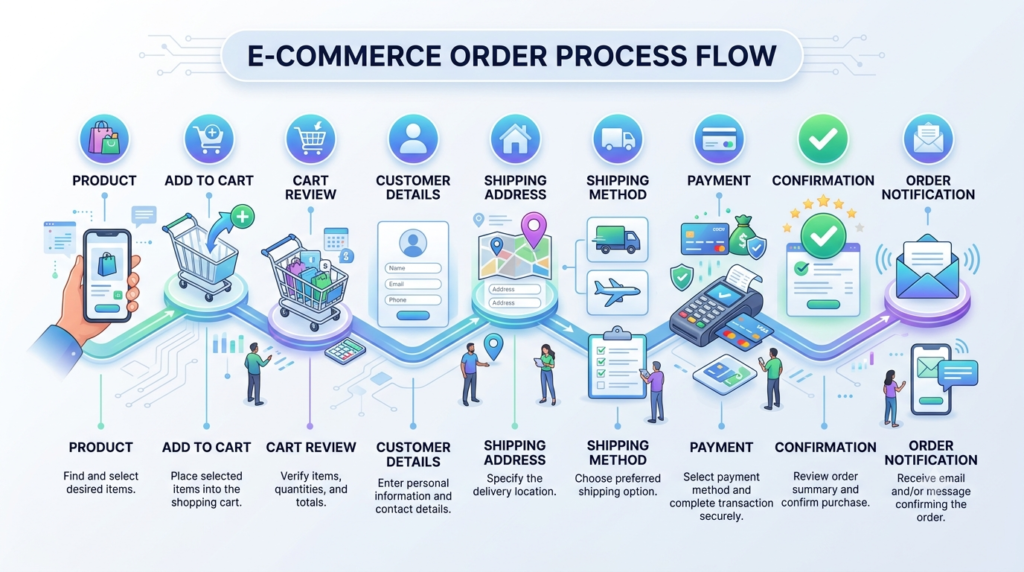
The checkout should not contain unnecessary fields.
We should verify:
- Required fields
- Address validation
- Phone number validation
- Email validation
- Shipping calculation
- Tax calculation
- Discount codes
- Coupon restrictions
- Minimum order rules
- Free shipping thresholds
- Payment selection
- Order summary
- Terms acceptance
- Final order confirmation
Customers should always be able to see the total amount they are expected to pay before completing the transaction.
Unexpected charges appearing late in the checkout process can create abandoned carts and damage customer confidence.
6. Synchronize Inventory Across All Sales Channels
Inventory synchronization becomes particularly important when products are sold through multiple channels.
A store may have inventory distributed across:
- E-commerce website
- Physical shop
- Marketplace platforms
- Social commerce
- Mobile applications
- Multiple warehouses
We should establish a reliable source of inventory truth. The system should automatically update stock when:
- An order is placed
- An order is cancelled
- An order is refunded
- An item is returned
- An item is manually adjusted
- New inventory is received
We should also test stock thresholds.
For example, if only one product remains, the website should accurately display the appropriate availability status. Once that item is purchased, the product should no longer appear as available for purchase unless additional stock exists.
This prevents overselling, cancelled orders, customer complaints, and inventory discrepancies.
7. Verify Mobile UI Readiness
A modern e-commerce store must be designed for smartphones, not simply reduced from desktop size.
We should test the store on different screen sizes and orientations.
Important mobile elements include:
- Mobile navigation
- Hamburger menu
- Product filters
- Search
- Product galleries
- Product variation selectors
- Add to Cart button
- Buy Now button
- Cart drawer
- Checkout forms
- Payment options
- Sticky navigation
- Pop-ups
- Cookie notices
- Chat widgets
Buttons should be large enough to tap comfortably.
Text should remain readable without zooming, and product images should not create unnecessary horizontal scrolling.
We should pay particular attention to the mobile checkout experience, because complicated forms and small interface controls can cause customers to abandon their purchases.
8. Test Website Speed and Core Performance
Before launch, we should measure website performance on both desktop and mobile devices.
Important areas include:
- Image optimization
- Browser caching
- CSS optimization
- JavaScript loading
- Font loading
- Server response time
- Database performance
- CDN configuration
- Lazy loading
- Third-party scripts
Large images, unnecessary plugins, excessive animations, and poorly optimized scripts can slow down an e-commerce website.
We should also test important pages individually rather than checking only the homepage.
The pages that deserve particular attention are:
Homepage, category pages, product pages, cart, checkout, and account pages.
9. Complete E-Commerce SEO Checks
Search engine optimization should be completed before launch rather than added as an afterthought.
We should verify:
- SEO-friendly URLs
- Page titles
- Meta descriptions
- Heading structure
- Product descriptions
- Category descriptions
- Image alt text
- Internal links
- XML sitemap
- Robots.txt
- Canonical URLs
- Breadcrumbs
- Product structured data
- Organization structured data
- Open Graph information
Product pages should have unique and useful content rather than manufacturer descriptions copied across multiple websites.
We should also check whether development or staging settings are accidentally preventing search engines from crawling the production website.
10. Configure Website Security
Security should be reviewed before the store starts accepting customer information and payments.
We should confirm:
- SSL certificate is active
- HTTPS is enforced
- Administrative accounts are protected
- Strong passwords are used
- Two-factor authentication is enabled where available
- Plugins and themes are updated
- Backups are configured
- Security monitoring is active
- Unnecessary administrator accounts are removed
- Payment information is handled through appropriate payment providers
We should never store sensitive payment information unnecessarily on the website.
11. Test Shipping and Delivery Rules
Shipping configuration should accurately reflect the store’s actual delivery process.
We should test:
- Shipping zones
- Delivery locations
- Shipping charges
- Free shipping rules
- Weight-based shipping
- Product-based shipping
- Local delivery
- Store pickup
- Estimated delivery dates
- Restricted locations
Different products may require different shipping rules, so we should test representative products from each category.
The checkout should clearly communicate delivery charges and estimated delivery information.
12. Verify Coupons, Discounts, and Promotions
Promotional functionality should be tested before customers receive access to the store.
We should verify:
- Percentage discounts
- Fixed discounts
- Product-specific discounts
- Category discounts
- First-order offers
- Coupon expiration dates
- Minimum purchase requirements
- Usage limits
- Customer-specific coupons
- Free shipping coupons
We should test both valid and invalid coupon codes.
A discount should never reduce the product price incorrectly or create an unintended negative order value.
13. Configure Customer Accounts and Notifications
Customer communication is an important part of the purchasing experience.
We should test emails or notifications for:
- Account registration
- Order confirmation
- Payment confirmation
- Order processing
- Order shipment
- Order delivery
- Cancellation
- Refund
- Password reset
Emails should contain accurate branding, order information, contact details, and relevant links.
We should also verify that emails are actually delivered rather than merely generated by the website.
14. Set Up Analytics and Conversion Tracking
Before launch, we should configure analytics so that customer behavior can be measured from the beginning.
Useful events include:
- Product view
- Search
- Add to cart
- Remove from cart
- Begin checkout
- Payment selection
- Purchase
- Coupon usage
- Account registration
We should ensure that the purchase event records accurate information such as:
- Order value
- Currency
- Transaction ID
- Products
- Quantity
Proper tracking allows us to identify where customers leave the buying process.
15. Test Search and Product Filtering
Large e-commerce stores require effective search and filtering.
We should test searches for:
- Exact product names
- Product categories
- Brand names
- SKUs
- Common spelling variations
- Partial keywords
Filters should work correctly for attributes such as:
- Price
- Brand
- Size
- Color
- Availability
- Rating
- Category
An empty search result should provide useful alternatives rather than simply displaying a blank page.
16. Check Legal and Customer Information Pages
Before launch, customers should be able to easily access important business policies.
At minimum, we should review:
- Privacy Policy
- Terms and Conditions
- Shipping Policy
- Return Policy
- Refund Policy
- Cancellation Policy
- Contact information
The policies should accurately reflect the store’s actual operating practices.
17. Perform a Final Cross-Device Test
Before launch, we should conduct a final test across different devices and browsers.
The testing checklist should include:
| Area | Desktop | Tablet | Mobile |
|---|---|---|---|
| Homepage | ✓ | ✓ | ✓ |
| Navigation | ✓ | ✓ | ✓ |
| Search | ✓ | ✓ | ✓ |
| Product page | ✓ | ✓ | ✓ |
| Cart | ✓ | ✓ | ✓ |
| Checkout | ✓ | ✓ | ✓ |
| Payment | ✓ | ✓ | ✓ |
| Forms | ✓ | ✓ | ✓ |
| Images | ✓ | ✓ | ✓ |
| Account area | ✓ | ✓ | ✓ |
We should test actual user journeys rather than checking individual pages in isolation.
18. Create a Pre-Launch E-Commerce Checklist
Before switching the store to live mode, we should confirm the following:
Technical
- SSL is active
- Domain is correctly configured
- Hosting is stable
- Backups are working
- Website loads correctly
- 404 pages are configured
- Forms work correctly
Products
- Product information is complete
- Images are optimized
- Prices are correct
- SKUs are correct
- Variations work
- Inventory is synchronized
Payments
- Payment gateways are connected
- Test payments have succeeded
- Failed payments have been tested
- Refunds have been tested
- Order statuses update correctly
UX
- Navigation is intuitive
- Wireframes have been validated
- Checkout is simple
- Calls to action are visible
- Search works
- Filters work
Mobile
- Responsive layout works
- Buttons are touch-friendly
- Product images display correctly
- Checkout works on mobile
- Payment screens work properly
- Pop-ups do not obstruct important content
Marketing and SEO
- Page titles are complete
- Meta descriptions are configured
- Sitemap is available
- Analytics is connected
- Conversion tracking works
- Social sharing information is configured
19. Conduct a Soft Launch
Instead of immediately promoting the store to a large audience, we should consider conducting a controlled soft launch.
A small group of users can test the complete customer journey.
Their feedback can reveal problems that technical testing may miss, such as:
- Confusing navigation
- Difficult product selection
- Unexpected shipping charges
- Complicated checkout
- Unclear return policies
- Poor mobile usability
- Missing product information
We should resolve these issues before beginning a larger advertising campaign.
20. Prepare for Post-Launch Monitoring
The launch date is not the end of the process.
During the first few days and weeks, we should monitor:
- Website uptime
- Orders
- Payment failures
- Abandoned carts
- Conversion rate
- Traffic sources
- Inventory levels
- Customer enquiries
- Refund requests
- Website errors
- Mobile performance
A successful e-commerce website launch should be treated as the beginning of continuous optimization.
Final E-Commerce Store Launch Checklist
A store is ready for launch when customers can discover products, understand their value, add them to a cart, complete payment securely, receive confirmation, and track their orders without unnecessary friction.
The most important areas to validate are payment gateway reliability, UX wireframes, inventory synchronization, mobile UI readiness, checkout functionality, website performance, security, SEO, analytics, and customer communication.
By completing this checklist before launch, we can reduce technical failures, prevent inventory problems, improve the customer experience, and create a stronger foundation for long-term e-commerce growth.
A professional online store should not merely look attractive. It should be fast, secure, intuitive, mobile-ready, operationally accurate, and designed to convert visitors into customers.